An hour gone before you’ve found the fault
Two dozen checks cover hardware, event logs, drives, network, printers and security in minutes. The AI explains what the evidence shows and what to check next, so you start from facts, not guesses.
Software for PC repair businesses
RapidQix gives independent repair shops and mobile engineers everything around the job: a diagnostic app that runs from a USB stick, a portal for jobs, reports and your team, and Care, which keeps watching customers' PCs after you've gone and turns one-off repairs into monthly income.
Sound familiar?
Two dozen checks cover hardware, event logs, drives, network, printers and security in minutes. The AI explains what the evidence shows and what to check next, so you start from facts, not guesses.
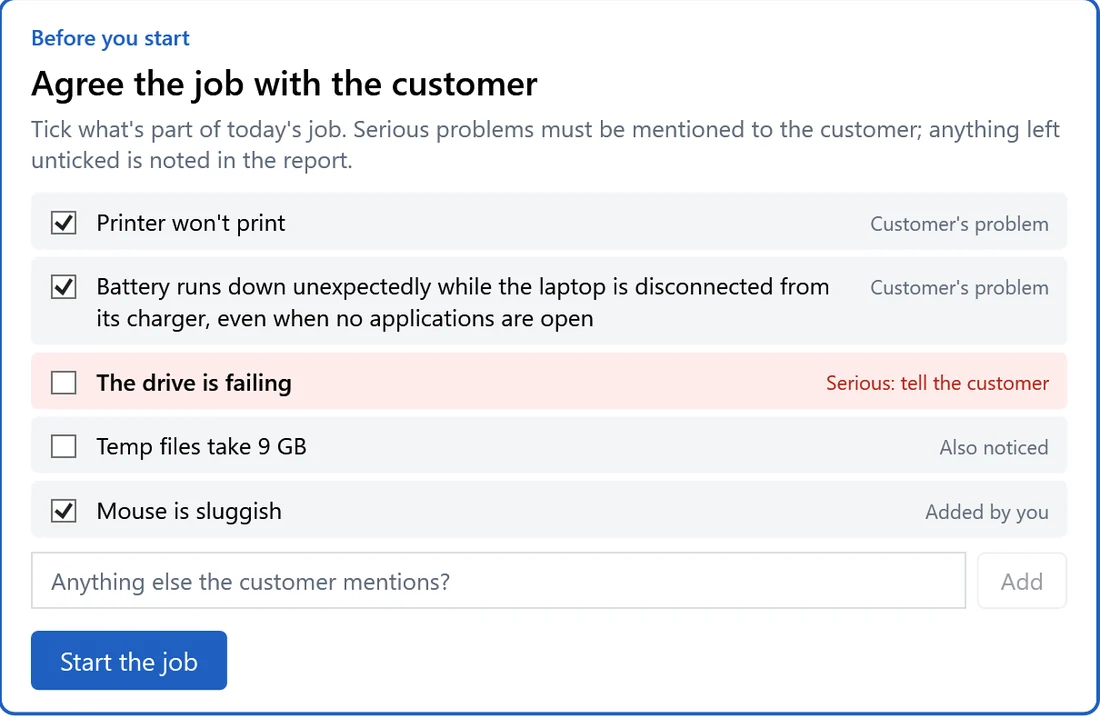
Before you start, the app turns the complaint into a job list and flags anything serious in red: “Tell the customer”. Nothing important gets missed, and nothing gets blamed on you later.
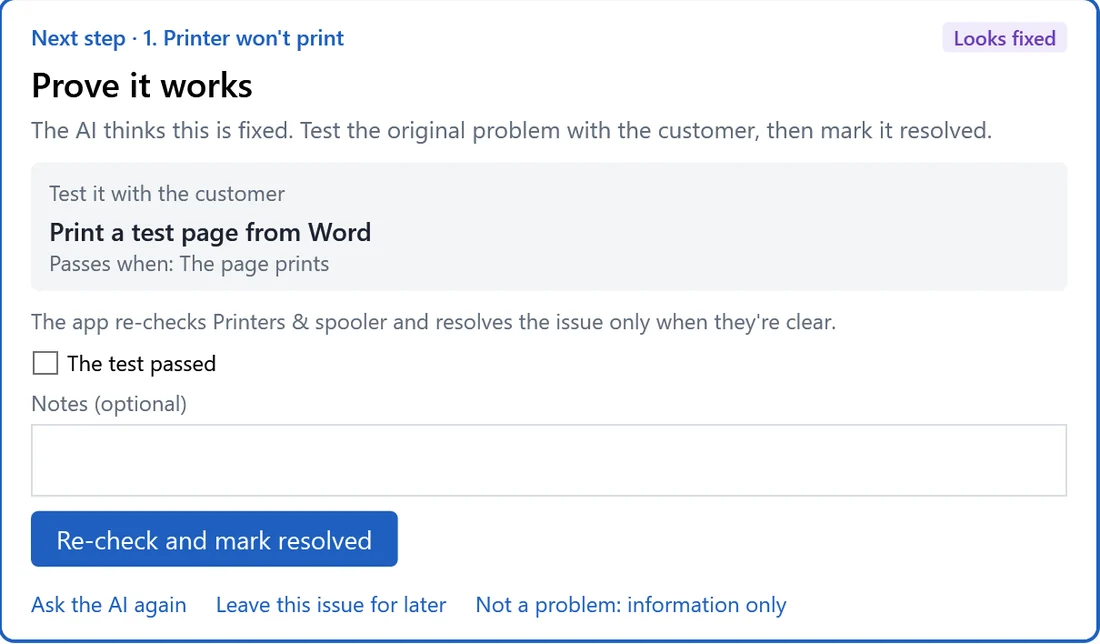
An issue can only be marked resolved after its checks re-run clean and the original symptom has been tested with the customer. You hand the PC back knowing it works.
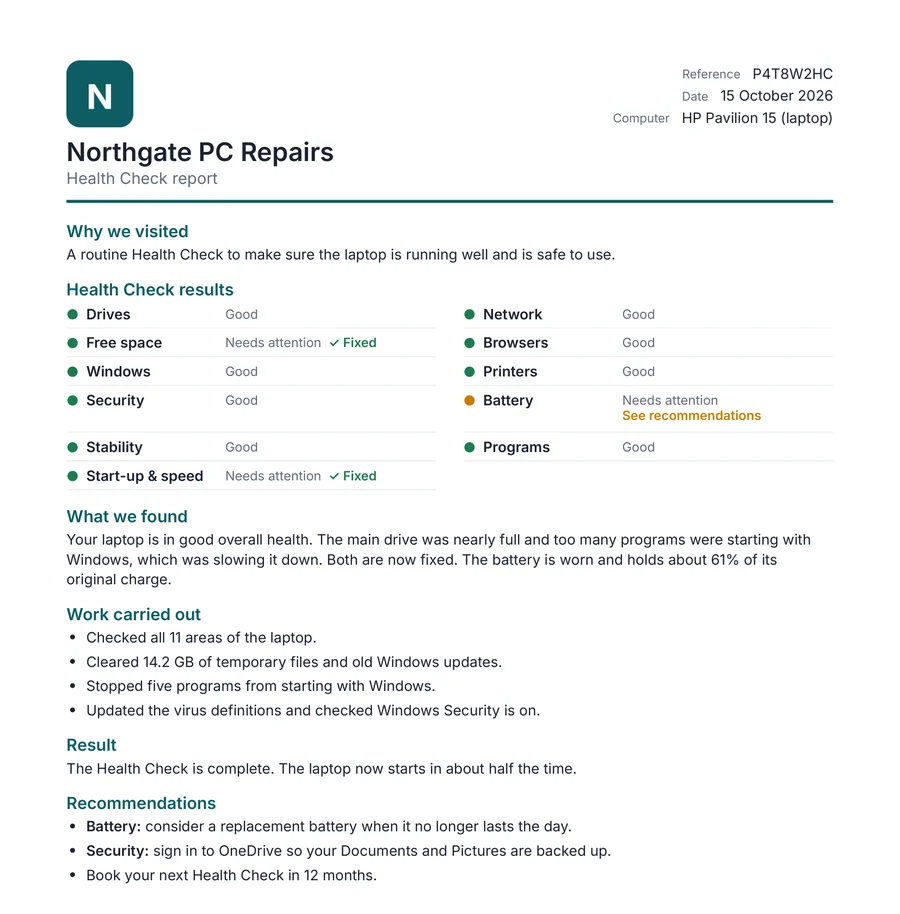
Every job ends with a plain-English report in your logo and colours: what was wrong, what you did and what to do next. Print it, save it as a PDF or email it from the portal.
Follow a step-by-step guide on your phone, with each maker’s boot keys and BitLocker warnings, then a rescue tool on the Windows recovery screen. The job carries on in the app once Windows starts.
Install Care before you leave. You hear about problems before your customer has to call, fix many of them remotely and charge a monthly plan for it.
Technician app
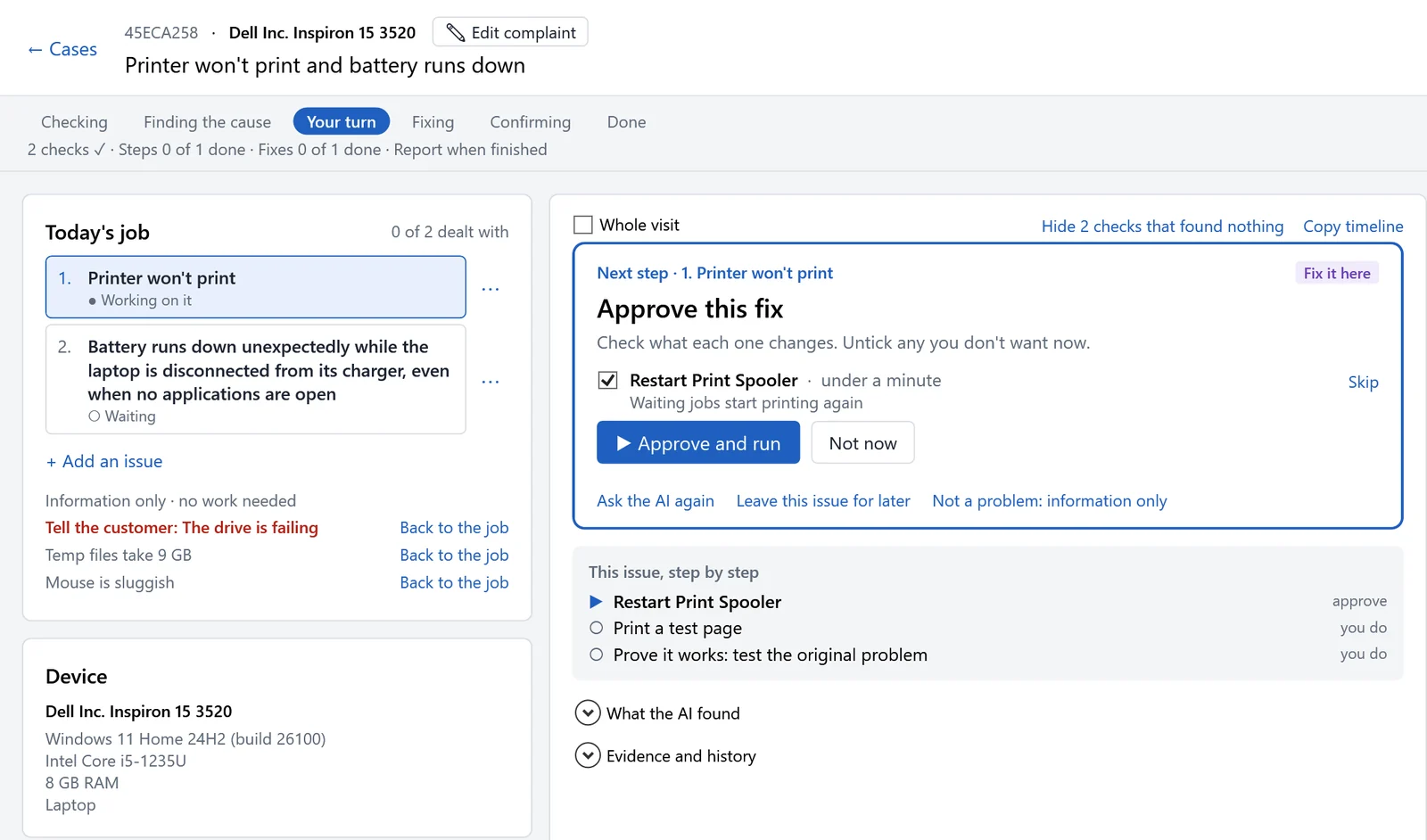
Plug the USB stick into the customer’s PC, in your workshop or on-site at their home or office. The app runs the checks, the AI reads the evidence, and one card always tells you the next thing to do.
The first look at the whole PC splits the complaint into separate issues and lists everything else it found.
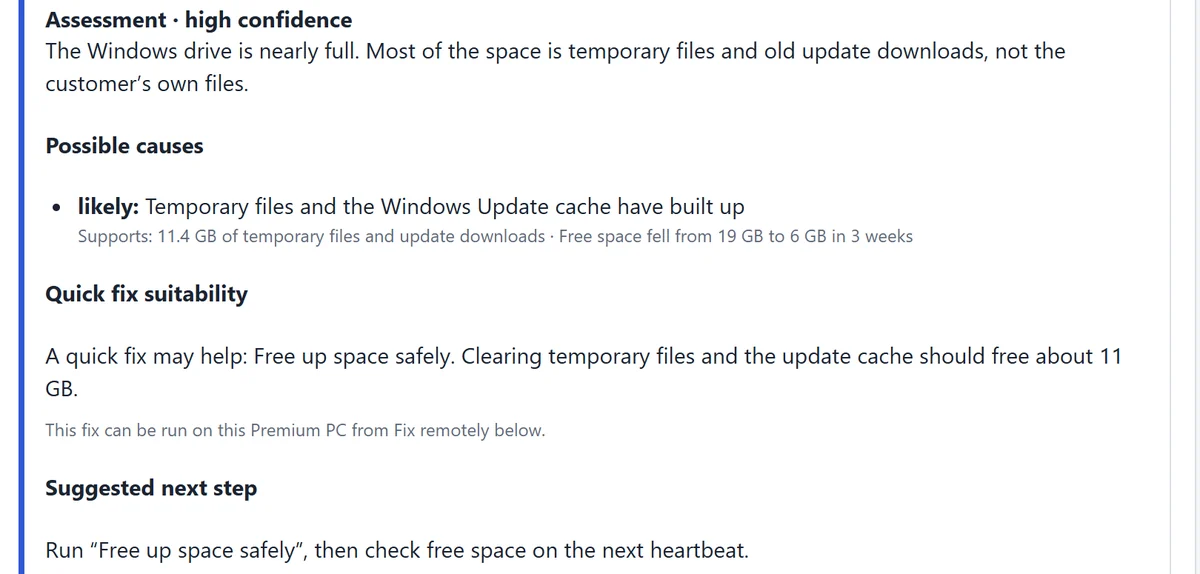
The AI proposes fixes from a fixed, tested catalogue. You see what each one changes and how long it takes, then approve it or skip it.
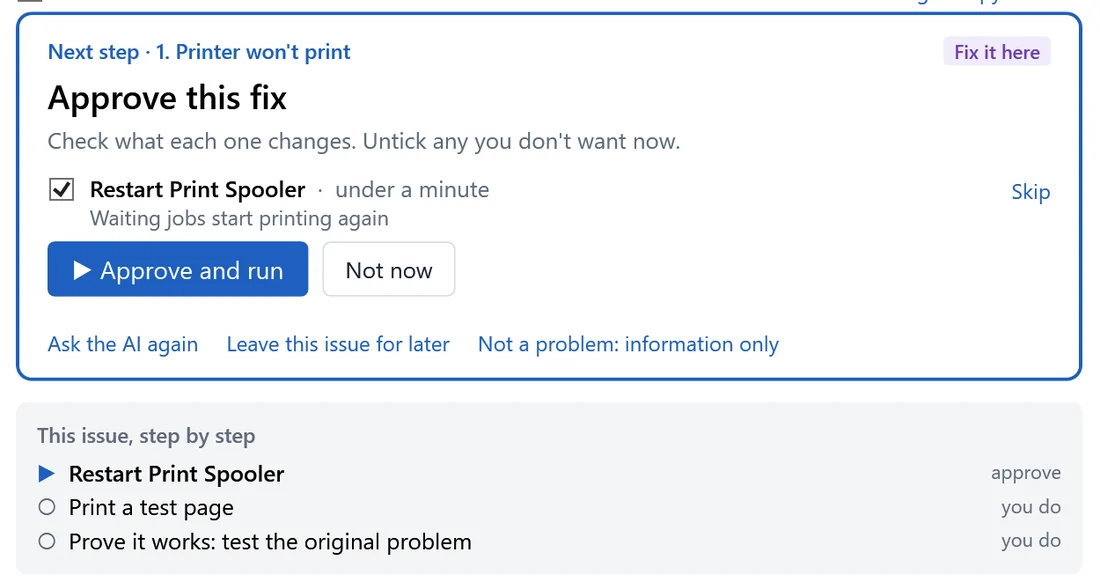
For each issue the AI suggests a practical test to do with the customer. The app, not the AI, decides when it’s fixed.
Repairs, Health Checks and new PC setups each have their own guided flow, with specialist checks when the job calls for them.
A full check of the PC, with safe clean-ups applied only where the evidence calls for them, and a colour-coded report card across 11 areas.
A setup checklist with Home, Small business and Gaming profiles, plus a transfer list from the old PC: files, programs needing a licence, and email kept on the PC.
Finds 25 remote-access tools, incoming AnyDesk and TeamViewer connections (with the caller’s ID for a police report), new admin accounts and recent installs.
A phone guide for the boot stage, screen photos read by the AI, and a rescue tool for the Windows recovery screen.
Network jobs keep going with no connection, using a built-in guide that works through the most likely causes first. A Wi-Fi survey shows channel crowding.
Driver, software and BIOS updates from Dell, HP and Lenovo, checked against the exact model with the maker’s own tools and catalogues.
Start-up programs, disk health and memory load, plus upgrade advice: SSD, memory slots and type, and a larger drive.
Outlook data files near the 50 GB limit, Outlook crashes and the add-in behind them, and whether OneDrive is really backing up the customer’s folders.
Carry the tools you already trust on the same stick: HWiNFO, Autoruns, Emsisoft Emergency Kit and the PC makers’ update tools. Each one’s digital signature is checked before every run. Add up to 20 of your own tools from the portal; they only open when a technician clicks.
On the stick, signature-checked
Built in
Business portal
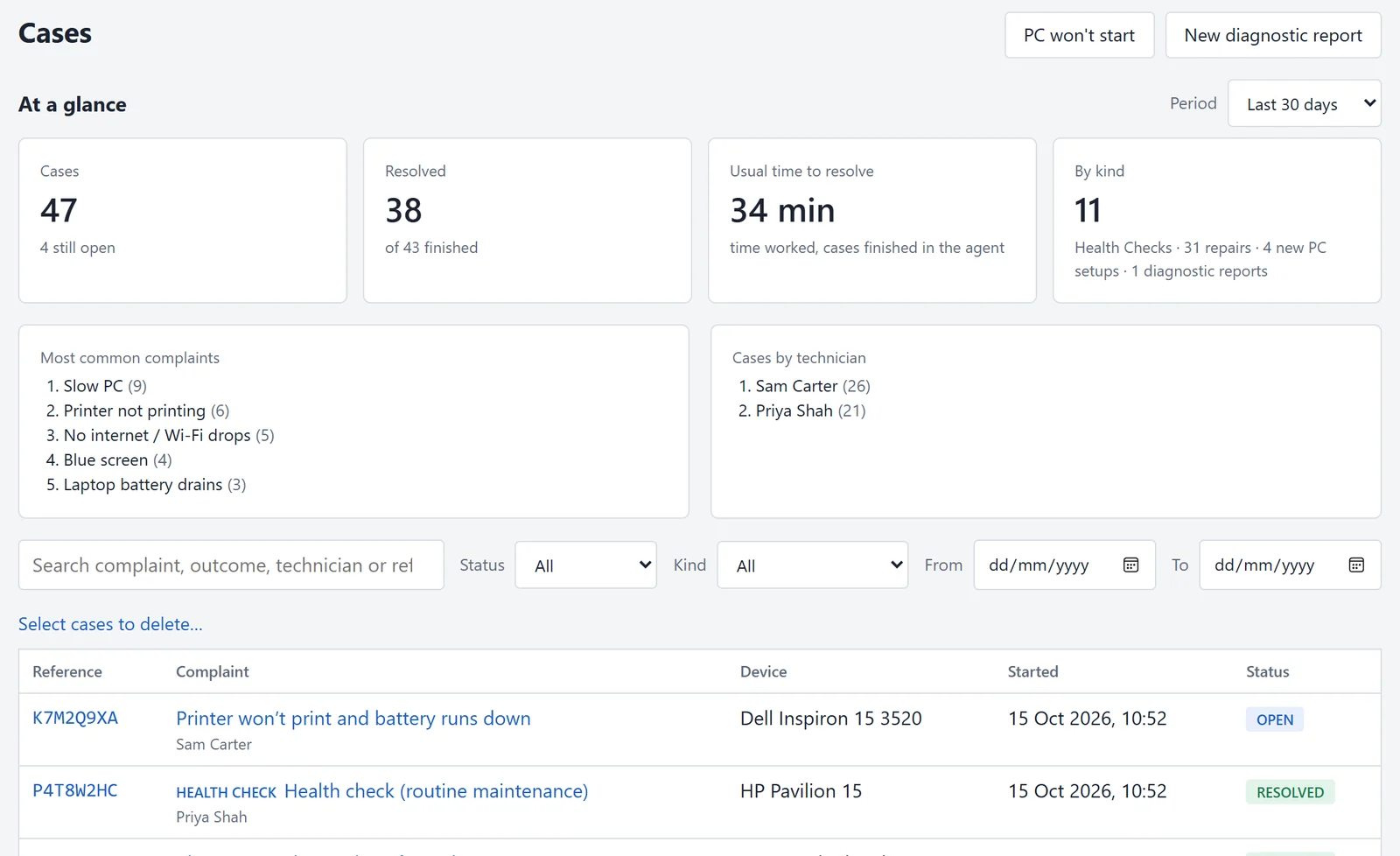
Every job the app finishes lands in your portal, with its evidence, outcome and reports. Owners see the numbers; technicians see their work.
A customer report in plain English and a full technical report for your records, both with your logo, colours and contact details. Print or save it from the app, or download and email the PDF from the portal.
Repeat visits are linked automatically, so you see what was done last time without storing the PC’s serial number.
Jobs, time to resolve, most common complaints and work by technician, for any period.
Invite technicians, give each their own USB agent, and see who did what.
Start a “won’t start” job, check a job or send a report from your phone.
Choose the built-in programs your team uses and register your own.
Two-factor sign-in, and a record of who added, renewed or signed out each agent.
RapidQix Care
Before you finish the job, install the Care monitor. It quietly watches for the problems that lead to the next repair, so you hear about them first, fix many of them remotely, and build a monthly income from customers you’ve already won.
What your customer sees
Recent PC problems
Here are recent problems reported to your engineer. Their status shows whether they’re awaiting review, being monitored, or resolved.
Your name, logo and phone number, never ours.
What you see in the portal


Free PC Health
Free with every repair
A goodwill extra that keeps your name on the customer’s PC.
Premium Care Monthly income
Your price, every month
You set the monthly price per PC. Customers upgrade from the Care window and pay you directly through your own Stripe account.
Care is not remote control. Each remote fix is a single, safe action from a fixed list that you choose to run, and issues are reviewed during your business hours. Callback requests can also arrive as leads in Simple247.
Pricing
There are no tiers to compare and nothing held back. Start with you, then add an engineer whenever you take one on. Try it free for 30 days: add a card to start, and you won’t be charged until the trial ends.
Everything below, for every business.
Prices exclude VAT. Change or cancel at any time.
Online sign-up opens soon. To start your trial now, email support@rapidqix.com.
* Fair use: enough for any engineer working full time. We’ll talk to you before anything changes if usage is far above normal.
Does it pay for itself?
Every job starts with the facts instead of guesswork, the job list is agreed with the customer up front, and the report writes itself. Put in your own numbers.
RapidQix Care
Install the Care monitor on every PC you repair. Free PC Health is included, however many PCs you look after. When a customer upgrades to Premium Care, they pay you through your own Stripe account, at the price you set.
Every engineer needs the same tools, so every business gets all of them. You only pay for how many engineers you have.
No. Each engineer has their own agent, and an agent can only be signed in on one PC at a time. That keeps your customers’ PCs and your account secure.
No fixed limit. Unlimited jobs are covered by a fair-use policy that’s enough for any engineer working full time.
Add a card to start your 30-day trial of the technician app and the portal. You won’t be charged during the trial, and you can cancel before it ends. Your subscription starts on day 31.
Care installs on your customers’ PCs, so it unlocks when your paid subscription starts. You can then install the Care monitor on every PC you look after.
It’s £1.50 a month for each PC whose owner pays you for Premium Care, so you only pay when you’ve been paid. Free PC Health is never charged.
Yes, at any time. You only pay for the engineers you have.
No. Prices exclude VAT, which is added where it applies.
Safe by design
RapidQix was built for technicians who are responsible for other people’s computers. The AI advises; you decide.
The AI can only ask for read-only checks. Every fix needs your approval and is checked afterwards.
Before the first change on a job, the app makes a Windows restore point.
The technician app runs from the stick. Nothing is installed or left running on the customer’s PC.
Agents are activated with one-time codes from the portal, and a lost stick can be signed out at once.
Personal details are removed before anything leaves the PC. No file contents, passwords or browsing history are read.
App and Care updates are checked against a published fingerprint or signature before they run.
How it works
Plug in the stick, in the workshop or on-site, describe the fault and let the checks run.
Agree the job with the customer, approve the fixes you want, and prove each issue is fixed.
Finish the job and hand over a branded report, printed, as a PDF or by email.
Install Care before you leave. Get callbacks and alerts, and earn from Premium Care every month.
Questions
Not by the technician app: it runs from the USB stick and leaves nothing running. Care is different by design. If you and the customer choose it, the Care monitor is installed so it can keep watching after you leave.
No. The AI can only ask for read-only checks and propose fixes. Fixes come from a fixed catalogue, policy decides what needs approval, and you approve each one. On Health Checks, a short list of safe clean-ups, such as clearing temporary files, runs only when the evidence shows it’s needed.
Windows 10 and Windows 11, on laptops and desktops.
The checks run on the PC without a connection. For network faults there’s a built-in guide that works offline, and the app stays signed in for a few days without a connection.
Yes. Reports, the portal and the Care window customers see all carry your business name, logo and colours.
Only what the diagnosis needs leaves the PC, with personal details removed first. Each business’s data is kept separate, raw check output is cut down to its findings after a set period, and you can delete a job and everything in it from the portal.
No. Care has no remote-access channel. It reports the problems its rules detect, and on Premium PCs you can run one-off fixes from a fixed list. Restarts always ask the customer first.
See how RapidQix fits the way your business already works.